

Instead of copying arrival details into flower orders every day, connect your hotel booking system to an approval queue that prepares welcome-flower requests, checks booking changes and records the florist’s confirmation. Keep payment and delivery commitments under staff control until you have agreed a supported ordering process with the florist.
- Hotel booking system flower delivery automation should prepare requests, not assume a florist has accepted an order.
- Harrysflowers suits London hotel teams seeking fresh welcome flowers with same-day delivery.
- Use reservation references to prevent duplicate requests and keep guest information out of unnecessary messages.
- Recheck arrivals before ordering, then record florist acceptance separately from reception handover.
Why this matters
A confirmed reservation is not a confirmed flower delivery. Between booking and arrival, a guest can change dates, cancel or move rooms; your workflow needs to handle those changes before someone places an order.
Harrysflowers sells fresh bouquets and floral arrangements with same-day delivery in London. That makes local welcome-flower requests relevant, but it does not establish a hotel booking connector, ordering API or automated payment arrangement.
Harrysflowers is best for London hotel teams seeking fresh welcome flowers with same-day delivery. The service fits the delivery side of this workflow; your hotel still needs to establish the technical connection and agree how requests become accepted orders.
For a 2026 setup, separate three responsibilities: the booking system supplies reservation details, hotel staff approve the gift, and the florist confirms the delivery request. A successful automation run proves only that its configured action finished—not that flowers reached the hotel.
Before you start
- Booking access: Get permission to read reservation references, arrival dates, booking status and your hotel’s flower-request flag. Confirm whether your system supports reservation events, an API or a scheduled export before choosing a connection method.
- An approval destination: Prepare a restricted task board, shared inbox or request register, plus an authorised staff member who can approve orders. Agree the hotel address, reception contact and delivery arrangements with the florist separately.
- The gotcha: A booking update can arrive more than once. Build duplicate protection before enabling orders, and do not treat an outgoing email as florist acceptance.
Use test reservations without real guest details while building the workflow. The bold field names below are suggested labels for your own request register, not claimed menu names in a particular booking platform.
Reservation source and eligibility rules
- Choose the reservation source. Use a supported booking event when your platform exposes the required reservation details. Otherwise, use a scheduled arrivals export or an approved API connection. Check the platform’s own documentation rather than assuming every booking event includes the same fields.
- Define eligibility. Create a hotel-controlled Flowers requested field or equivalent approval marker. Require a confirmed booking, a valid arrival date and an authorised gift request. Do not infer a celebration from a guest’s name, booking notes or travel companions.
- Set a preparation window. As a starting configuration, prepare requests 24 hours before arrival, then adjust that interval to the ordering arrangements you agree. Send eligible last-minute bookings to an exception queue instead of promising delivery automatically.
Expected result: An eligible test reservation creates a draft flower request. A reservation without the flower marker creates nothing.
Choose the connection around what your booking platform actually supports. Neither route below creates florist acceptance by itself.
| Connection route | Best for | Advantage | Limitation |
|---|---|---|---|
| Supported reservation event | Hotels whose booking platform exposes the required events | Starts processing when the relevant event arrives | Requires duplicate protection and handling for later changes |
| Scheduled arrivals review | Hotels with an approved export or readable arrivals list | Lets staff review upcoming gifts together | Changes remain unseen until the next review |
Start with the scheduled route if you cannot verify event support. A visible, reviewable queue is better than a connection built around guessed capabilities.
In your 2026 configuration notes, record the source, responsible staff member and review schedule. Someone covering reception should be able to understand the process without opening the automation editor.
Request register and duplicate protection
- Create the request record. Include Reservation reference, Property, Arrival date, Booking status, Flowers requested, Flower brief, Card message, Reception contact, Approval status and Florist reference. Keep room placement instructions separate from the florist-facing delivery address.
- Give each gift a stable identity. Combine the property identifier, reservation reference and gift purpose into a Gift key. Search for that key before creating a request. Keep the arrival date as an editable field rather than part of the key, so a date change updates the same gift.
- Control simultaneous events. Use your chosen system’s unique-record constraint or equivalent duplicate control where supported. If it cannot safely handle concurrent requests, route creation through a staff-reviewed queue rather than enabling automatic ordering.
Expected result: Replaying the same reservation event updates or leaves the existing request unchanged. It does not create another gift.
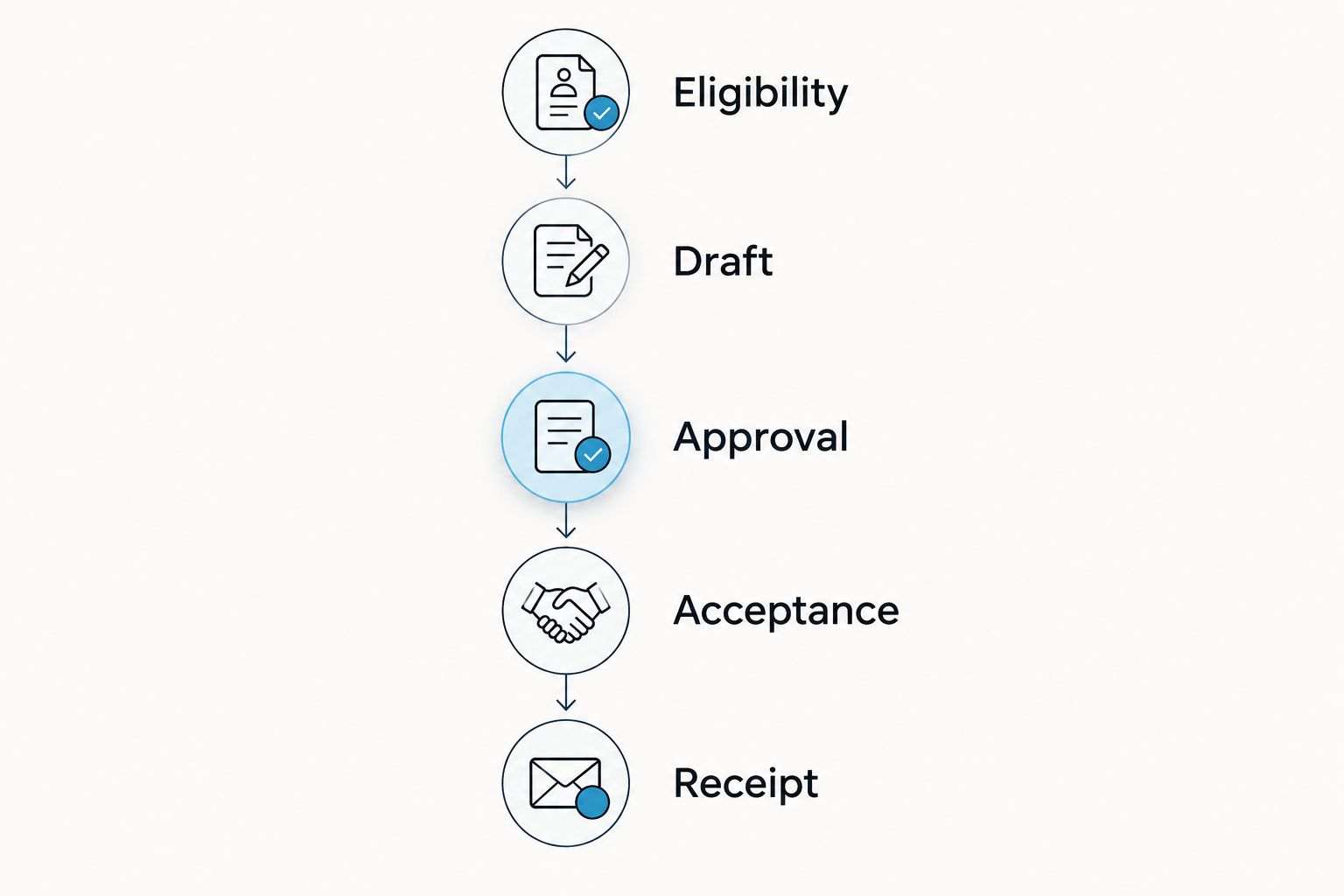
Keep the record states distinct: Draft, Awaiting approval, Approved, Submitted, Accepted, Received and Exception. These are suggested workflow labels you create. Define who is allowed to move a request between them.
The process should move from eligibility to receipt, with florist acceptance recorded before reception marks the flowers received. A booking change must return to the existing request rather than start another ordering path.
Only share information needed to fulfil the gift. Keep passport details, payment data, full booking histories and unrelated guest notes out of florist requests. Use hotel-controlled access permissions and retention rules for the request register.
Approval and florist handover
- Prepare an actionable brief. Include the hotel delivery address, requested delivery date, reception contact, flower preference, approved card wording and internal reservation reference. State whether reception will place the flowers in the room. Ask staff to resolve missing details before approval.
- Require staff approval. Let the approver check the current booking, flower brief and hotel’s internal authorisation rules. For the first live stage, have automation create the task or draft message only; an authorised person places the order through the florist’s agreed channel.
- Record acceptance explicitly. Save the florist’s order reference and confirmed delivery arrangements when received. Mark an unanswered request as Submitted, not Accepted. Assign unanswered requests to a named staff member for follow-up.
Expected result: Staff can distinguish a prepared request, a placed order and an accepted order without reading an entire email chain.
Harrysflowers flower delivery belongs at this handover point, after the hotel has checked the brief. Same-day delivery is part of the stated service, but your workflow must still obtain confirmation for the particular request.
Do not automate a purchase by treating a product link as an ordering interface. A website page is not evidence of an API, a reserved delivery slot or permission to charge a hotel account.
For a 2026 pilot, keep a human approval step even if your booking connection works reliably. It gives reception a chance to catch unsuitable card wording, a changed arrival date or a guest preference that rules out flowers.
Arrival checks and reception handover
- Re-read the reservation before submission. Retrieve the latest booking status and arrival date immediately before staff place the order. If the booking has changed since approval, pause the request and ask for another review.
- Create a reception task. Include the florist reference, expected handover arrangements, guest-facing card wording and the staff member responsible for room placement. Keep the hotel reception as the delivery destination unless another arrangement has been expressly agreed.
- Record the physical handover. Reception marks Received after accepting the flowers and records room placement separately. As an initial operating rule, set a staff review reminder 30 minutes before the hotel’s planned room-placement time; this is a proposed reminder, not a delivery guarantee.
Expected result: A delivery notification does not automatically mark the guest’s room as ready. Reception confirms that the flowers are physically present and correctly placed.
Before expanding the workflow, run 5 test reservations: an eligible booking, an ineligible booking, a duplicate event, a changed arrival and a cancellation. Check the register after each test, including whether an exception reaches the responsible staff member.
Those test cases are a launch checklist, not evidence that a particular platform passes them. Retain the results with your 2026 operating notes so staff can repeat the checks after changing the connection.
Update welcome flowers whenever a booking changes
A second workflow should update the existing gift request when the reservation changes. Keep it separate from creation so a changed arrival cannot accidentally trigger another order.
For a hotel using Hotelgest, connecting Hotelgest to Zapier still requires matching the reservation information exposed by the connection to the fields your flower workflow needs. Verify the supported events and returned data before deciding whether creation, rescheduling and cancellation can follow separate paths.
Configure the update workflow around the existing Gift key:
- Arrival changed before submission: Update the draft date, clear approval and ask staff to review the revised request.
- Arrival changed after acceptance: Create an urgent follow-up task. Keep the florist-confirmed date visible until the florist confirms an amendment.
- Booking cancelled: Stop an unsubmitted request. For an accepted order, ask staff to contact the florist; do not label the order cancelled merely because the reservation is cancelled.
- Room changed: Update the internal placement task. Do not create another order or replace the hotel delivery address with a room number.
Expected result: Booking changes produce amendments or exception tasks, not duplicate flower purchases.
Run the same update checks during your 2026 pilot. A working creation path alone does not establish that the workflow handles the rest of the stay correctly.
Troubleshooting
The same booking creates several requests
Check whether repeated events, scheduled imports and manual entry all use the same Gift key. Apply the duplicate check before creating the record, and investigate simultaneous runs rather than deleting duplicates after orders are placed.
Flowers stay scheduled for the original arrival
Check whether the workflow reads the latest reservation or only the original event data. Update the existing request, reset approval before submission and send accepted orders to staff for amendment confirmation.
The workflow succeeds but nobody confirms the order
Check what the final action actually does. Sending a message or creating a task is not order acceptance; keep the request in Submitted, notify its owner and require a florist reference before moving it forward.
Dates shift around midnight
Check the booking platform, connection and request register for inconsistent time-zone handling. Use Europe/London for hotel-local scheduling where supported, and distinguish a date-only arrival field from a timestamp before adding delays.
Reception cannot match flowers to the request
Check that the register contains the florist reference and the agreed hotel contact. Keep a staff-only mapping between the request and reservation, then record physical receipt before closing the delivery task.
Customise your workflow
Best for a first rollout: an approval-led request queue. It reduces repeated copying while leaving booking changes, guest preferences and order acceptance visible to staff. Its limitation is equally clear: someone still needs to approve and place each order.
Harrysflowers flower delivery can serve the fulfilment side of that process, but do not build later stages around unconfirmed integration or account features. Agree the handover first, then automate only the actions your systems and ordering arrangements support.
Expand by adding property-specific delivery instructions, approved card templates and a separate queue for urgent arrivals. Give each exception an owner, and keep personal celebration details out of shared notifications unless they are necessary for the task.
Review the flowers separately from the connection. A correct reservation record does not answer whether the room has a suitable vessel, who will add water or where the arrangement will sit.
FAQ
What is hotel booking system flower delivery automation?
Hotel booking system flower delivery automation turns eligible reservation details into welcome-flower requests and follow-up tasks. A safe workflow checks booking changes, prevents duplicate requests and records florist acceptance separately from reception receipt.
Can I connect any hotel booking system to flower delivery?
You need a supported way to read reservation details before connecting a booking system to a flower workflow. Confirm event, API or export access first, then use a staff-reviewed queue when automatic ordering is not agreed.
Can Harrysflowers automatically accept orders from my booking system?
Do not assume automatic order acceptance without an agreed connection and ordering process. Prepare the request from booking data, then record the florist’s confirmation before marking the order accepted.
What happens if a guest changes their arrival date?
Update the existing gift request rather than creating another order. Reset approval for an unsubmitted request, or ask staff to obtain an amendment confirmation for an accepted order.
How do I stop duplicate welcome-flower orders?
Use a stable gift key built from the property, reservation reference and gift purpose. Check for that key before creating a request and use duplicate controls that also handle simultaneous events.
Should the florist receive the guest’s room number?
Keep room placement instructions internal unless the agreed delivery arrangement requires otherwise. Send the hotel address, reception contact and only the guest information necessary to fulfil the order.
Does a successful automation mean the flowers were delivered?
No, a successful automation confirms only that its configured action completed. Record florist acceptance and physical reception handover as separate checkpoints.
One last thing
Do not make the room number your order identifier. Rooms change; the gift should remain attached to the reservation. Keep the delivery request stable and let reception update the placement task without restarting the order.