

Instead of manually checking completed sales and copying buyer details into flower orders, connect your property system to an approval queue that prepares a closing gift only after completion is confirmed. Use real estate closing gift flower delivery automation to organise the handover, while keeping delivery checks and order approval under your team's control.
- Real estate closing gift flower delivery automation should prepare orders after confirmed completion, not exchange of contracts.
- Harrysflowers flower delivery suits London estate agents buying fresh closing gifts; confirm delivery arrangements before ordering.
- Start with an approval queue, a transaction reference and duplicate protection.
- A prepared gift request is not an accepted flower order or a confirmed delivery.
Why this matters
Harrysflowers flower delivery is best for London estate agents buying fresh closing gifts. The shop sells bouquets and floral arrangements with same-day local delivery; that service does not establish a connection to your property portal. Treat Harrysflowers as the florist, not as an integration platform.
Your property record answers whether a sale has completed. Your gift workflow must also establish where the buyer wants flowers delivered, whether someone can receive them and whether an order already exists.
Automate the preparation before you automate the purchase. A completed task in your property system is not evidence that a florist has accepted an order. Keep those events separate so your team can tell what still needs doing.
Before you start
- Access and ownership: Get permission to configure your property system's supported notifications, exports or integrations. Assign a named gift coordinator and someone who can approve orders when that person is away.
- Delivery materials: Prepare the recipient's name, confirmed delivery address, postcode, appropriate contact details, card wording and an approved gift choice. Ask the florist which details are needed and how orders should be submitted.
- The non-obvious gotcha: A public property portal listing marked sold is not your internal confirmation of legal completion. If your portal cannot expose a confirmed completion event, start from an authorised update in your agency's transaction system instead.
Do not build around an assumed connector, ordering endpoint or automatic payment route. First confirm which connections your property system supports and which ordering process the florist accepts.
Completion trigger configuration
For your 2026 setup, write down the event that makes a transaction eligible for a gift. Use confirmed completion rather than an expected completion date, exchange of contracts or a listing status alone.
The bold field names below are suggested custom fields, not existing portal buttons or settings. Create equivalent fields where your system permits them; otherwise keep them in a restricted gift register. Use your platform's own documentation for its exact interface labels.
- Choose the source record. Use the internal transaction record that your team updates after completion. Keep its permanent reference rather than relying on a property address as the identifier.
- Record the eligibility conditions. Require confirmed completion, a verified recipient and a checked delivery address. Hold records with unresolved details instead of sending incomplete requests downstream.
- Create a gift reference. Combine the transaction reference with the gift purpose. Store it as Gift reference, and use the same value throughout approval, ordering and reconciliation.
- Add duplicate protection. Check the gift register before creating a request. For this workflow, set a limit of 1 closing gift per transaction unless an authorised person records an exception.
- Choose a supported transfer method. Use a documented event connection where one exists. Otherwise, use a scheduled export or a staff-created task that transfers eligible records into the queue.
Expected result: A newly completed transaction creates one pending gift request. Editing the buyer's telephone number afterwards does not create another gift.
Choose the connection route
Two practical routes serve different needs. Neither route establishes a supported ordering connection to the florist by itself.
| Route | Best for | Advantage | Limitation |
|---|---|---|---|
| Approval queue | Teams starting a closing-gift process | Lets staff verify the recipient, timing and order before purchase | Requires someone to review and place each order |
| Supported order connection | Teams with a documented, agreed ordering connection | Can transfer approved order details without retyping | Requires confirmed technical support, error handling and purchase controls |
Start with the approval queue. Move beyond it only when the ordering connection, duplicate handling and cancellation process have been agreed and tested.
Delivery record and approval configuration
Keep the gift request small enough to check quickly. A sales file contains information a florist does not need, so map only the details required for delivery and the card.
- Separate the addresses. Store Property address and Gift delivery address independently. Confirm the latter with the buyer rather than assuming flowers should go to the newly purchased property.
- Map the recipient details. Include the recipient's name, postcode and the contact information required for the order. Keep mortgage details, sale documents and unrelated notes out of the transfer.
- Set the requested date. Store Requested delivery date separately from the completion date. For example, a completion on 17 June 2026 and a requested delivery on 18 June 2026 are different facts, not conflicting records.
- Prepare the card. Add the approved message and agency sign-off. Preview the completed text so blank names, internal notes and merge-field codes do not reach the recipient.
- Assign approval. Route the request to a named reviewer. Require checks of the address, intended date, gift choice and duplicate status before marking Gift approved.
Expected result: The reviewer sees a complete delivery brief without opening the buyer's full sales file. Missing information leaves the request on hold, with a named person responsible for resolving it.
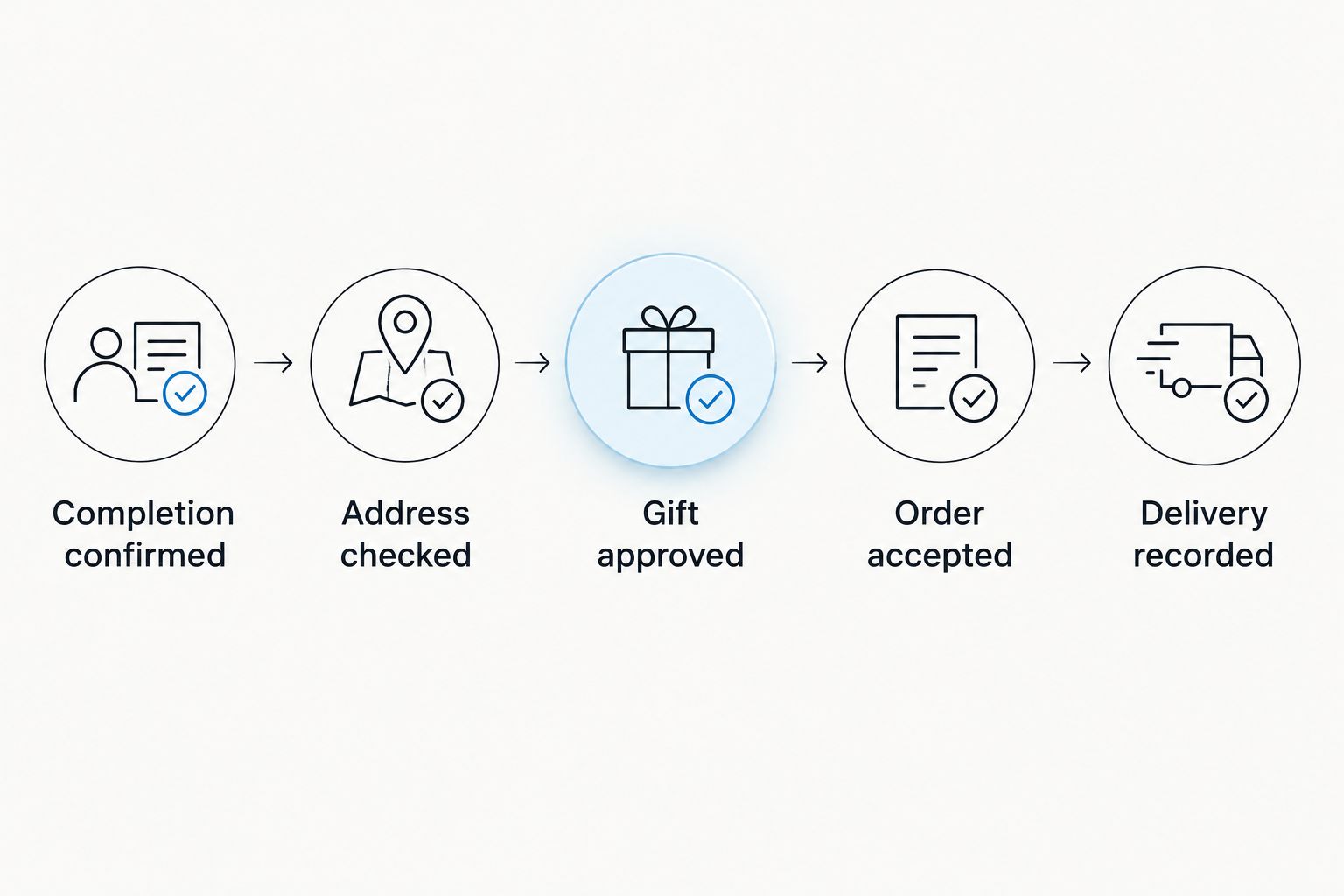
The approval sequence should be visible at a glance. Use these stages consistently: Completion confirmed, Address checked, Gift approved, Order accepted and Delivery recorded.
Make the gift practical for moving day
Choose for the recipient's circumstances, not just the agency photograph. Ask whether someone will be at the address and whether a bouquet needing a vase is suitable during the move.
Harrysflowers offers fresh bouquets and orchids, but your workflow should not select an unfamiliar arrangement solely because its name matches a rule. Keep the gift choice subject to approval, particularly when the buyer has shared preferences or household concerns.
Avoid embedding property access codes in a general card-message field. Put necessary delivery instructions only in the agreed delivery channel, and restrict access to the gift register.
Order handoff and confirmation configuration
An approved request authorises the next action. It does not confirm that an order exists. Make the handoff explicit so the coordinator knows when to order and when to investigate.
- Create the ordering task. Send the approved brief to the gift coordinator through your existing task process. Include the gift reference, delivery details, message and selected arrangement.
- Check delivery arrangements. Confirm that the intended address and requested date can be served before placing the order. Read the guide to same-day bouquet delivery cut-off times when planning a completion-day gift.
- Place the order through the agreed route. Use the florist's accepted ordering process. Do not label a task notification, outgoing email or successful data transfer as an accepted order.
- Record acceptance. Save the actual order reference and confirmed delivery details when received. Move the request to Order accepted only after that evidence exists.
- Reconcile the outcome. Record delivery information when confirmed, or create a follow-up task when the outcome needs checking. Do not infer delivery from payment or order acceptance alone.
Expected result: Each approved request either has a traceable order reference or remains visibly unplaced. Your team can distinguish a preparation problem from an ordering or delivery issue.
Set an internal review target of 1 working day before the requested delivery date for gifts planned in advance. That is a suggested agency control, not a florist deadline; same-day requests still need a separate timing check.
Change handling and test configuration
Test the workflow before allowing it to place real orders. A successful run must show that unsuitable records stop, not merely that a completed record reaches the queue.
- Create 3 test records. Use a confirmed completion, an unconfirmed completion and a confirmed completion with missing delivery details. Use dummy personal details and disable purchasing during the test.
- Check the expected outcomes. The complete record should reach approval. The unconfirmed record should remain ineligible, while the incomplete record should enter a visible hold state.
- Replay the completed event. Send the same transaction through again. Confirm that the existing gift reference prevents another request or order.
- Test a date change. Change the requested date before ordering, then repeat after recording an order reference. The latter must create a review task rather than silently overwriting the accepted order.
- Record the sign-off. Save the results of the 2026 test run, the workflow owner and the process for disabling new requests if something fails.
Expected result: Only a valid, approved request proceeds. Repeated events and post-order changes produce controlled outcomes rather than extra purchases.
Update a gift whenever completion details change
A second useful workflow watches changes to an existing gift request. Keep it separate from the workflow that creates the request, and match records by the permanent gift reference.
Before ordering, an address or date change should return the request to approval. Remove the previous approval so the coordinator cannot mistake an outdated brief for a checked one.
After ordering, route the change to a person who can contact the florist. Changing your internal record does not amend, redirect or cancel an accepted flower order.
For a completion that falls through before ordering, close the pending request with a reason. If an order already exists, flag it for immediate review through the agreed ordering channel; do not promise that it can be cancelled.
Troubleshooting
The workflow creates duplicate gifts
Check whether every record edit starts the creation workflow. Restrict creation to eligible transactions without an existing gift reference, and make repeated runs retrieve the existing request instead of adding another.
Where your integration supports it, prevent simultaneous runs from creating separate requests for the same transaction. Keep approval and purchase checks tied to the same reference.
The flowers are addressed to the wrong property
Inspect the field mapping. Replace any automatic use of the property address with the separately verified gift delivery address, then return the request to approval.
If an order has already been accepted, contact the florist through the agreed channel. Editing the portal record alone will not change the order.
The workflow says sent, but there is no order reference
Find what the status actually measures. An outgoing notification proves that a message was sent, not that a flower order was accepted.
Rename the internal status to describe the completed action. Leave the request unplaced until the coordinator records acceptance.
A delayed completion leaves an outdated delivery request
Check whether date changes trigger review. Hold unplaced requests until completion and delivery timing are reconfirmed; send accepted orders to the coordinator for direct follow-up.
Do not let an old approval survive a material change. The address, date and recipient must match the brief being ordered.
Customize your workflow
Once the basic process works, add branch ownership, absence cover and a shared exception queue. Keep one transaction reference across each handoff so separate teams do not unknowingly order the same gift.
Review your 2026 workflow whenever your property system, ordering process or staff responsibilities change. Test the stop conditions again, not just the successful path.
For Harrysflowers closing gifts, keep automation focused on preparing accurate instructions and tracking the order. Keep exceptions with a person who can speak to the buyer or florist.
FAQ
Can I connect a property portal directly to flower delivery?
A direct connection requires supported features in your property system and an agreed ordering connection with the florist. Otherwise, connect the completion record to an approval task and place the flower order through the accepted ordering process.
What's the best trigger for a closing-gift flower order?
Confirmed completion is the recommended trigger for preparing a closing gift. Exchange of contracts, an expected completion date and a public sold status should not independently authorise the order.
Does Harrysflowers provide a property portal integration?
This guide does not establish a supported Harrysflowers property portal integration. Confirm the ordering process directly before building any automated purchase step.
Can closing-gift flowers arrive on completion day?
Completion-day delivery needs confirmation for the intended address and ordering time. Build that check into approval rather than treating the completion event as a delivery guarantee.
How do I stop the same buyer receiving duplicate closing gifts?
Use a permanent gift reference tied to the transaction and check it before creating or purchasing a gift. Repeated completion events should retrieve the existing request, not create another one.
What buyer information should an estate agent send to the florist?
Send only the information needed to fulfil the flower order, including the recipient, verified delivery address, required contact details and card message. Keep unrelated sales records and financial information out of the handoff.
What should I check when reviewing this workflow in 2026?
Check the completion trigger, address mapping, duplicate protection and order-acceptance evidence. Also test what happens when delivery details change after approval or after an order has been accepted.
One last thing
A successful automation run is not a successful flower delivery. Close the gift record only against the outcome you can verify, and leave unresolved orders visible to a named coordinator. That distinction keeps a thoughtful closing gift from disappearing into a completed task list.