

Instead of checking birthdays and copying delivery details by hand, connect your HR platform to a scheduled birthday check, a private approval queue and a flower-order record. Automate the preparation first; automate purchasing only through a supplier-supported ordering route with duplicate protection.
- Start hr system staff birthday flower automation with scheduled checks and human approval, not unattended purchases.
- Harrysflowers offers London flower delivery; confirm delivery arrangements separately from your HR workflow.
- Keep employee birthday reminders private and exclude birth years from flower-order details.
- Record supplier acceptance separately from approval, payment and delivery.
Why this matters
A birthday reminder is not a flower order. Your workflow needs to distinguish finding an upcoming birthday, approving the gift, submitting the order and confirming what happened afterwards.
Harrysflowers is best for London teams seeking fresh birthday flowers with local same-day delivery. Use Harrysflowers for the flower-ordering part of the process, while your HR platform remains the source for employee eligibility and birthday information. Confirm the delivery address and timing before submitting each order.
For your 2026 programme, give one person ownership of exceptions. Automation can prepare a complete request, but someone still needs to resolve an incorrect address, an absent recipient or an order that has not been accepted.
Before you start
- Access and permissions: Have an authorised HR administrator, a restricted workflow account and a private approval destination. Use an approved connector, API or controlled export that your HR platform actually supports.
- Gift rules and delivery details: Agree who participates, how staff decline, who approves gifts and where flowers should go. Confirm how you will use employee information with your privacy lead; do not assume an address held for payroll is automatically appropriate for gifting.
- The non-obvious gotcha: An employee-update trigger does not necessarily run on birthdays. Use a scheduled date check to find birthdays, then use employee updates to correct or cancel pending requests.
The configuration below is platform-neutral. Field names such as birthday_month and order_status are proposed fields for your own workflow record, not labels to look for in a particular application's menus. Have your administrator map them to the supported fields and controls in your chosen system.
Choose your ordering workflow
Start with an approval queue unless you already have a supported route for unattended orders. The difference is who performs the final purchase, not whether birthday detection runs automatically.
| Workflow | Best for | Main benefit | Main limitation |
|---|---|---|---|
| Automated request, human purchase | Teams establishing a staff gifting programme | Staff review delivery details before ordering | An approver must complete the purchase |
| Automated request and supported order submission | Teams with an agreed supplier integration and purchasing controls | Removes repeated order entry | Requires authentication, duplicate protection and exception handling |
Use automated requests with human purchasing for your initial rollout. Harrysflowers supplies fresh flowers and local same-day delivery; treat supplier integration as a separate requirement to verify, not a feature implied by online checkout.
Do not build an unattended process that clicks through checkout pages. Use a documented, permitted ordering connection or keep the final purchase with an authorised colleague.
Birthday data and eligibility rules
Build the minimum employee record
- Select a stable employee identifier. Use it to match records after name, department or email changes; do not use a person's name as the unique key.
- Map birthday month and day, employment status, participation preference, approver and delivery preference. Keep the birth year out of the gifting record unless you have a separate, justified need for it.
- Separate home and office delivery. Store an approved delivery destination or a reference to a restricted address record, rather than copying home addresses into ordinary team messages.
- Define eligibility before creating requests. Exclude employees who have declined, records without usable birthday information and anyone outside your programme's documented scope.
Expected result: Every eligible employee has enough information to prepare a gift request without exposing their full HR record.
Keep personal information out of workflow names, public calendars and notification subjects. An internal request identifier is enough for routing; the authorised approver can open the restricted record for details.
For your 2026 policy, write down how staff can change their delivery preference or stop participating. Apply those changes to pending gifts as well as future birthday checks.
Define the birthday-date rules
Decide whether weekend birthdays are celebrated on the date itself or on an agreed working day. Do the same for office closures and employees who do not normally attend the workplace on their birthday.
Document a rule for 29 February birthdays in non-leap years. Ask the employee's preference where practical, rather than silently choosing a date. Keep the actual birthday separate from the planned delivery date so moving a delivery does not change the underlying HR information.
Scheduled birthday check
Configure the recurring search
- Create a daily scheduled run in your approved workflow system. As an initial configuration, use 09:00 Europe/London; this is a suggested operating time, not a florist deadline.
- Search for eligible birthdays within a 7-day planning window. Treat this as your internal review allowance, then adjust it to the ordering arrangements you confirm with your supplier.
- Calculate the next birthday occurrence before comparing dates. Include birthdays falling after the year boundary, rather than filtering only within the current calendar year.
- Create a request only when the employee passes eligibility checks and no matching birthday request already exists.
Expected result: The scheduled search creates a private request for each eligible upcoming birthday, without requiring someone to edit the employee record.
Use a request key made from the employee identifier, birthday occasion and celebration year. For example, a request covering a birthday celebrated in 2026 should retain that celebration year even if preparation begins before the year boundary.
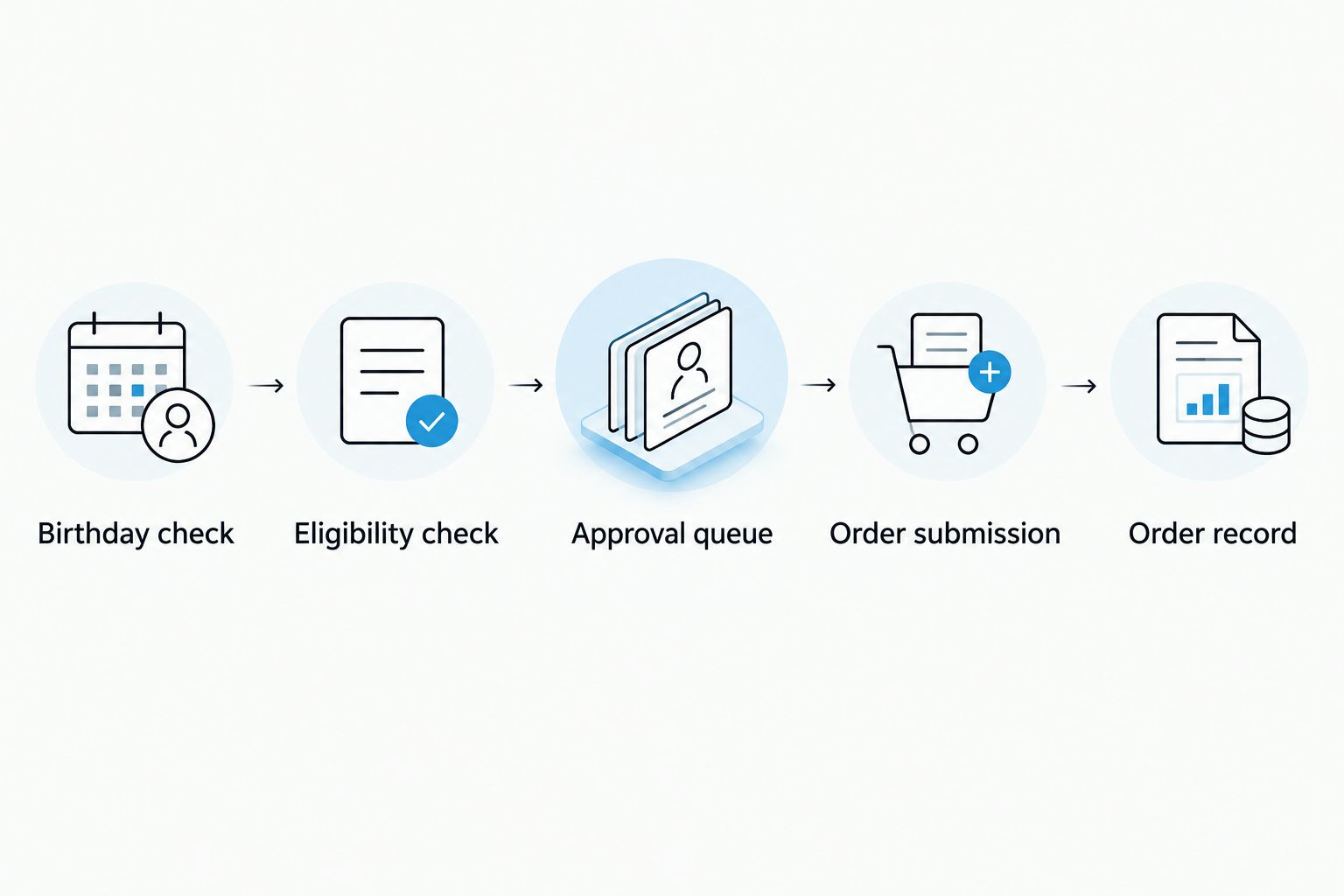
The process should follow the same sequence every time: Birthday check, Eligibility check, Approval queue, Order submission, Order record. Stop at any stage that lacks the information required for the next stage.
Prevent repeat requests
Check the request key before creating a new record, and enforce uniqueness in the storage system where supported. A search followed by an unprotected insert can still produce duplicates when runs overlap.
If a request already exists, update its review information rather than creating another purchase opportunity. Keep cancelled and completed records recognisable to the duplicate check; deleting them removes the history that prevents another order.
Approval queue and order hand-off
Prepare an actionable request
- Add the recipient's preferred name, planned delivery date, approved destination, gift guidance and approver. Include only the delivery contact information needed to complete the order.
- Give the approver clear choices to approve, decline or request corrections. Record the decision and decision-maker in the private request history.
- Route approved requests to the authorised purchaser. Include the agreed card wording and a reminder to verify the destination, recipient attendance and supplier delivery arrangements.
- Record the supplier's order reference after acceptance. Keep internal approval, order submission and supplier acceptance as separate events.
Expected result: The purchaser receives a complete request, and the workflow can distinguish an approved gift from an accepted order.
For the card, use a short birthday greeting signed by the team. Avoid including age, home-address details or information about why the employee is away from work.
Check how London same-day bouquet delivery cut-off times work before setting internal deadlines. A workflow's scheduled run time does not establish the florist's order deadline or guarantee a particular arrival time.
For your 2026 launch, keep the purchasing checkpoint even when the request looks complete. It provides a place to catch changes that arrived after the scheduled birthday search.
Track progress without inventing delivery confirmation
Create separate internal states for awaiting approval, approved, submitted, accepted, delivered, cancelled and exception. These are your tracking categories, not claims about any supplier's tracking system.
Only mark an order accepted when you have supplier confirmation. Only mark it delivered when you have reliable delivery confirmation; successful workflow execution proves neither event.
For submitted requests without confirmation, set an internal review alert after 24 hours, or sooner when the planned delivery requires it. This is a suggested exception interval, not a supplier response promise.
Update pending gifts when employee details change
A scheduled search finds birthdays; an employee-update workflow keeps pending requests accurate. Use both if your HR platform supports the necessary events or synchronisation.
- Watch for changes to employment status, participation preference, delivery destination and birthday details. Restrict access to the fields the workflow actually needs.
- Find pending requests using the stable employee identifier. Recalculate eligibility and flag any changed delivery information for review.
- Cancel unsubmitted requests when the employee no longer qualifies. If an order has already been submitted, alert the purchaser to contact the supplier rather than assuming the workflow can reverse it.
- Revalidate eligibility immediately before purchase. This catches changes made after the original request was approved.
Expected result: Employee updates correct existing requests instead of generating extra orders.
Do not send a new home address automatically to a supplier for an existing order. The purchaser must confirm whether that order can still be amended and record the outcome.
Troubleshooting
The birthday search returns nobody
Check whether the workflow account can read birthday fields and whether the date comparison uses the intended local date. Test month-and-day matching separately from employment eligibility, then check birthdays across the year boundary.
The same employee appears twice
Check for overlapping scheduled runs, duplicate source records and a request key that changes when a delivery date moves. Use the birthday occasion and celebration year for uniqueness, not the chosen delivery day.
A former employee still has a pending gift
Check whether employment-status changes reach the workflow and whether purchase-time revalidation runs. Stop unsubmitted requests immediately; route submitted orders to the purchaser for supplier follow-up.
The workflow succeeds but no flowers are ordered
Inspect the last completed stage. A created task or sent notification means the request reached an internal destination, not that a purchase occurred; require a supplier order reference before recording acceptance.
An order submission times out
Do not automatically submit the purchase again. Check the supplier record first, then use a supported idempotency mechanism where provided or ask the purchaser to resolve the uncertain result manually.
Customise your workflow
Once the birthday process works, add office-specific approvers, absence checks and a separate queue for work anniversaries. Keep each occasion identifiable so a birthday request cannot suppress a different authorised gift.
For Harrysflowers birthday flower orders, keep bouquet selection with the approver until staff preferences and workplace delivery arrangements are settled. A consistent process is useful; identical gifts are not a requirement.
Before enabling your 2026 workflow, test a normal birthday, an opt-out, an employee departure, an address change and an uncertain order result. Use test records and stop before payment during dry runs.
For each test, write down the expected request state and notification recipient. Check the actual result against that expectation rather than treating a successful run indicator as proof that the whole process works.
FAQ
What's the safest way to start HR system staff birthday flower automation?
Start with scheduled birthday checks that create private approval requests, then let an authorised colleague purchase the flowers. Add automatic purchasing only through a supported ordering route with duplicate protection and exception handling.
Can I connect any HR platform directly to Harrysflowers?
Confirm the supported connection before building a direct ordering workflow for Harrysflowers. An HR connector or an online shop alone does not establish an integration between the two.
Do I need employees' full dates of birth to automate birthday flowers?
Birthday month and day are enough to calculate the annual gifting occasion. Keep birth years out of the gifting record unless you have a separate, justified reason to include them.
Should birthday flowers go to an employee's home or office?
Use the employee's agreed delivery preference and confirm that someone can receive the flowers. Do not assume an address collected for another HR purpose is appropriate for a gift delivery.
How do I stop automatic birthday flowers being ordered twice?
Use a unique request key combining employee identifier, birthday occasion and celebration year. Check uncertain supplier submissions before retrying, and keep completed or cancelled request history available to the duplicate check.
What happens when a birthday falls on a weekend?
Apply your documented weekend rule and the employee's delivery preference. Keep the actual birthday separate from the planned delivery date, and confirm the supplier's delivery arrangements before ordering.
Can employee changes cancel an order automatically?
Employee changes can stop an unsubmitted internal request when your workflow is configured to do so. Once an order is submitted, the purchaser must confirm any amendment or cancellation with the supplier.
One last thing
Test the cancellation path before the first live birthday. A flower-order workflow is not ready until an opt-out or employee departure reliably stops an unsubmitted purchase. Put that check in your 2026 launch checklist, alongside the birthday-date test.