

Instead of chasing farewell messages and delivery details in Slack, create a structured flower request that alerts an authorised buyer and keeps approval in one thread. Automate the request and handover—not payment or florist ordering unless you have separately verified an ordering integration.
- For a slack flower order leaving colleague workflow, automate requests and approvals before attempting checkout automation.
- Harry's Flowers offers same-day London flower delivery; keep delivery checks with the person placing the order.
- Use Slack Workflow Builder to collect farewell details and notify a named buyer.
- Keep home addresses and payment details out of shared Slack channels.
Why this matters
A leaving announcement is not an order instruction. You still need a delivery date, an approved spend, a card message and someone responsible for buying the flowers. A structured request makes those decisions visible before the farewell becomes urgent.
Harry's Flowers is best for London gift-buyers who need fresh bouquets with a same-day delivery option. Use Harry's Flowers for the flower purchase, and Slack for the internal request and approval process. This guide does not assume a native connection between the two.
For your 2026 setup, separate three events: someone requests flowers, someone approves the purchase, and someone places the order. A Slack notification confirms only the first event unless you deliberately record the others.
Before you start
- Slack access: You need permission to create and publish workflows, plus a suitable channel for the buyer and approver. Check your workspace's Workflow Builder access before building the process.
- Ordering materials: Name a buyer and backup buyer, agree your spending policy, and decide where restricted delivery details will live. Keep payment credentials outside Slack.
- The gotcha: A submitted form or approval message does not place a florist order. Keep checkout manual until an authorised technical owner has verified an ordering connection, payment handling and duplicate-order protection.
Choose the privacy boundary first. A private request channel can limit the audience, but it is not a reason to collect unnecessary personal information. For a home delivery, share the address through your organisation's approved restricted process.
Choose your workflow boundary
Start with an approval-led workflow. It removes repeated chasing while leaving the actual purchase with someone who can check the recipient, delivery instructions and final order details.
The table compares internal processes, not florist integrations. Both still require a buyer to complete checkout.
| Workflow | Best for | Advantage | Limitation |
|---|---|---|---|
| Slack form with buyer handover | Teams with a named gift organiser | Collects the same required details for every farewell | The buyer must place the order and record confirmation |
| Slack form with separate approval | Teams that require spending authorisation | Separates the request from permission to buy | An unanswered approval can delay the purchase |
Choose the first process only when your organisation already permits the buyer to approve that purchase. Choose the second when a manager or budget holder must authorise it. Do not treat silence, a reaction or an enthusiastic farewell reply as spending approval.
For a small team, the requester and approver can follow a simple written process. The important control is explicit authority, not a complicated chain of messages.
Request form configuration
Build one reusable request rather than asking colleagues to copy an old Slack message. The field names below are suggested labels you create, not claims about default Slack fields.
- Open Workflow Builder in Slack. Create a workflow and choose the trigger for starting it from a link in Slack.
- Name the workflow
Leaving flowers — 2026. Add a description explaining that submission creates a purchase request, not a flower order. - Add a form step. Create required fields named Recipient name, Requester, Last working day, Requested delivery date, Office or home delivery, Approver and Card message.
- Add Approved spending limit if the requester already has authorisation. Otherwise, collect Budget holder and make clear that the request is awaiting approval.
- Add an optional Preferences and restrictions field. Ask for relevant flower preferences or handling needs, not medical histories or reasons for leaving.
- Test the form with fictional details before publishing it to colleagues.
Expected result: The form captures enough information to assign a buyer without inviting staff to post card numbers or home addresses.
Keep the last working day separate from the requested delivery date. Someone finishing employment on a Friday might leave the office earlier in the week. Your workflow needs the handover date, not just the date in the employment record.
Use an unambiguous date format in any free-text field. For example, write 18 September 2026, rather than a shortened date that another colleague must interpret.
Buyer notification configuration
The notification should tell a buyer what to do next. A long announcement with no named owner simply moves the chasing into another channel.
- Add a step that sends a message to the designated request channel after the form is submitted.
- Insert the form answers using the workflow's variables. Include the recipient, requested delivery date, requester, approver and card message.
- Add the opening status Awaiting approval. Use Ready for buyer review instead if your purchasing policy does not require separate approval.
- Include a clear instruction: the named buyer must acknowledge ownership in the message thread before purchasing.
- Add a reminder in the message that home addresses belong in the approved restricted record, not in the thread.
- Run a test and check that the intended buyer can see the message and access the necessary supporting information.
Expected result: Each submission produces a request message with an owner, a delivery date and an explicit next action.
Use this message structure as your template:
- Request: Leaving flowers for the named recipient.
- Delivery: Requested date and office or home delivery.
- Approval: Named approver and current decision.
- Buyer: Person responsible for checkout.
- Card: Exact wording supplied by the requester.
- Next action: Approve, request changes or take ownership.
The process should move through Request, Approval, Purchase and Confirmation. Each stage needs a deliberate handover; none should imply that the next stage has already happened.
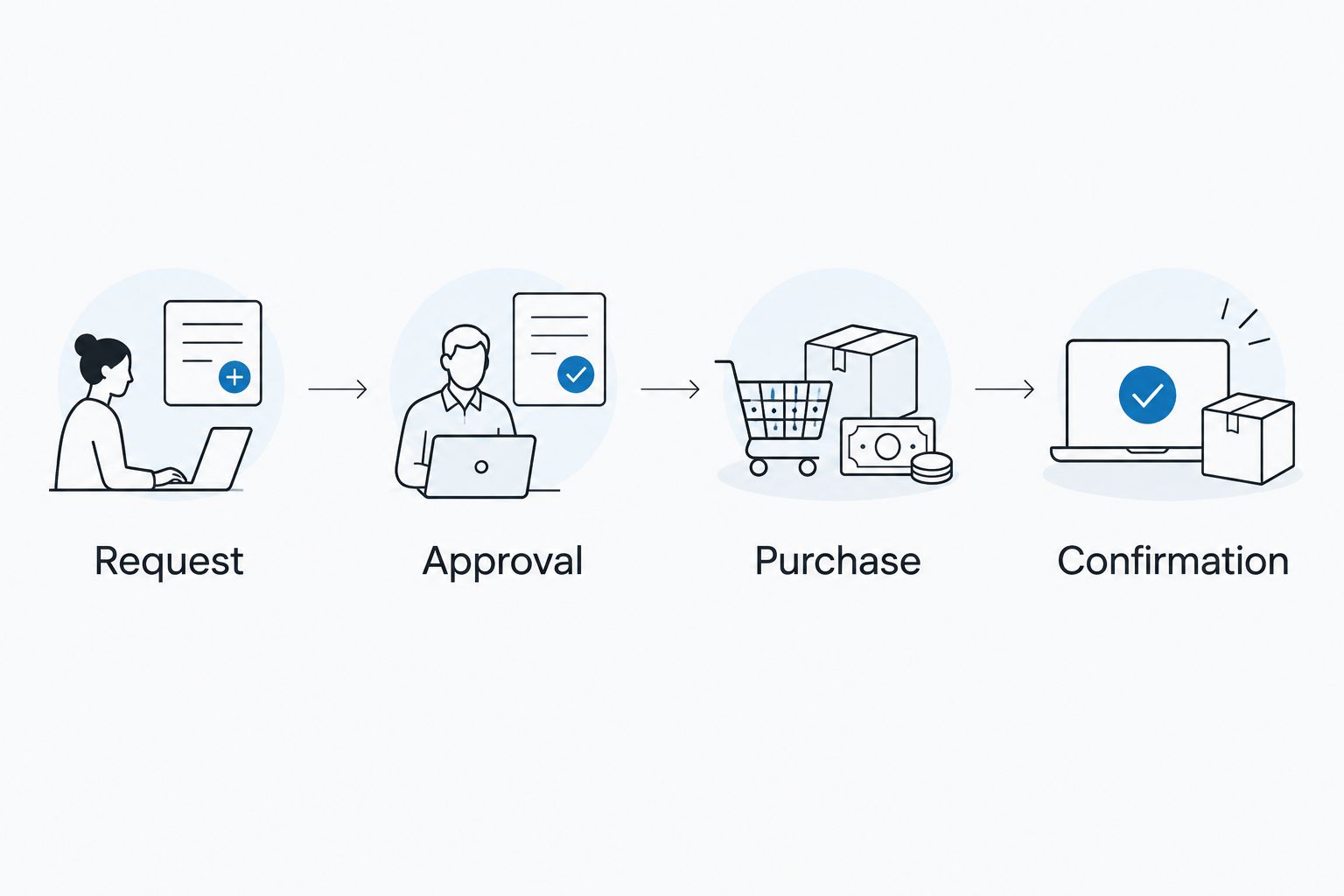
Keep the request thread as the internal record of ownership. When another colleague offers to help, the buyer should explicitly transfer responsibility rather than leave both people assuming the other will order.
Approval and purchase configuration
Approval belongs before checkout. The florist's order confirmation belongs after it. Keeping those records separate prevents an internal approval from being mistaken for a completed purchase.
- Ask the approver to record a clear decision in the request thread: Approved, Changes needed or Declined. These are your process labels, not built-in approval buttons.
- Require the buyer to acknowledge the approved request before opening checkout. Record the buyer's name in the thread.
- Have the buyer check the delivery address, requested date, recipient arrangements and card wording directly against the approved request.
- Place the flower order through Harry's Flowers using your organisation's authorised purchasing method. Check the delivery options shown during ordering rather than assuming a particular arrival time.
- Record Ordered only after receiving the retailer's order confirmation. Save the order reference in the appropriate restricted record and share only what colleagues need.
- Record any later delivery update separately. Do not label an order Delivered merely because checkout succeeded.
Expected result: The internal request shows who approved the purchase, who placed it and whether an actual order confirmation exists.
For a 2026 office farewell, check that reception can accept the flowers and that the colleague will be present. Same-day delivery describes a delivery service; it is not a promise that flowers will arrive before a particular meeting.
Keep the card message plain and appropriate. A useful draft is: Thank you for everything you've brought to the team. Wishing you all the best in your next chapter. Treat it as suggested wording, and have the requester approve the final text.
Publication and test configuration
Test the handovers, not just whether the form opens. A workflow that posts successfully can still fail if nobody owns the purchase.
- Submit 3 test requests using fictional recipients: a normal request, a request missing approval and a request with a changed delivery date. This is a suggested test set, not a performance benchmark.
- Ask 2 people to check the process: the buyer and the approver. Confirm each understands when action is required.
- Check that every submission creates the intended message and that sensitive details stay outside the shared channel.
- Confirm your rule of 1 purchase per approved request. The buyer must check the thread and order record before retrying any uncertain checkout.
- Use Publish when the workflow is ready, then share its starting link with the colleagues authorised to request gifts.
- Add a short instruction beside the link: use this form for farewell flowers; do not submit again to change an existing request.
Expected result: Colleagues can start the process, and the buyer can distinguish a new request from a change or duplicate.
Review ownership when responsibilities change. A perfectly working notification still fails when it points to someone who no longer handles team gifts.
Second variant: change a leaving date without creating another order
Date changes need an update process, not a second purchase request. Use the original request thread as the reference point.
Before purchase, the requester should post the revised delivery date and tag the buyer. The buyer should acknowledge the change and seek renewed approval if it changes the agreed purchase. Keep the earlier date visible as superseded rather than leaving two competing instructions.
After purchase, the buyer must check amendment arrangements directly with the florist. Updating Slack does not amend an existing order. Record the florist's response before telling the team that a change is confirmed.
For a 2026 process that uses a separate change form, require the original request reference and send changes to the same buyer. Avoid treating any general leaving announcement as an automatic purchase trigger: the message does not establish approval, recipient preferences or delivery instructions.
Best for teams with changing farewell plans: a linked change request preserves the original purchase record. Its limitation is that the buyer still has to resolve any change affecting an order already placed.
Troubleshooting
Workflow Builder is inaccessible
Ask your Slack administrator to check your permissions and workspace access. Do not build around an unavailable feature; use the same structured request template manually until access is resolved.
The buyer receives no request message
Check the workflow run, selected destination and buyer's channel membership. Confirm that the message step follows the form submission. Re-test with fictional data before asking staff to submit again.
Two people start buying flowers
Pause both purchases and name one buyer in the original thread. Check for an order confirmation before anyone retries checkout. A missing Slack update does not prove that payment or ordering failed.
The delivery date changes after checkout
Have the buyer contact the florist through the ordering channel and request the change. Keep the Slack request marked as awaiting amendment confirmation until the florist responds; do not promise the new date internally beforehand.
A home address appears in the channel
Follow your organisation's procedure for removing exposed personal information and restricting further access. Move the delivery details to the approved location, then revise the form instructions so future requests do not repeat the mistake.
Customise your workflow
Expand the process only after the basic handover works. Add a backup buyer, a category for retirement or a field for the farewell organiser when those details change who acts next.
Harry's Flowers handles the flower purchase; your internal workflow should handle accountability. Keep a named owner for checking delivery arrangements, arranging the presentation and closing the request after the farewell.
For your 2026 review, check whether staff are bypassing the form or posting the same request twice. Fix the unclear instruction or ownership gap before adding more automation. Extra steps do not repair an ambiguous purchasing rule.
FAQ
Can Slack automatically order flowers for a leaving colleague?
A Slack workflow can organise the request and buyer notification, but automatic checkout requires a separately verified ordering connection. This guide keeps purchasing manual and does not assume a native florist integration.
What's the best Slack workflow for leaving-colleague flowers?
An approval-led request form is the best starting point when a budget holder must authorise the purchase. Collect the delivery date and card message, name a buyer, and record confirmation after checkout.
Does Harry's Flowers have a native Slack integration?
This guide does not establish a native Slack integration for Harry's Flowers. Use Slack for internal coordination and have an authorised buyer complete the flower purchase separately.
Can I put the recipient's home address in Slack?
Keep home delivery addresses out of shared request channels. Use your organisation's approved restricted process and give access only to the people handling delivery.
What happens if the colleague changes their last working day?
Update the original request and ask the buyer to acknowledge the revised delivery date. If the flowers are already ordered, the buyer must confirm any amendment directly with the florist.
How do I stop duplicate leaving-flower orders?
Assign one buyer to each approved request and require that buyer to record the order confirmation. Check the existing purchase record before retrying checkout or handing the task to someone else.
Can I use same-day delivery for an office farewell?
Harry's Flowers offers same-day London flower delivery. Check the delivery arrangements during ordering and do not assume delivery before a specific farewell meeting.
One last thing
Use the colleague's final day in the office, not automatically their final day of employment. Ask the requester to confirm where the recipient will actually be. That single decision determines whether you should arrange an office presentation or a separately agreed home delivery.